



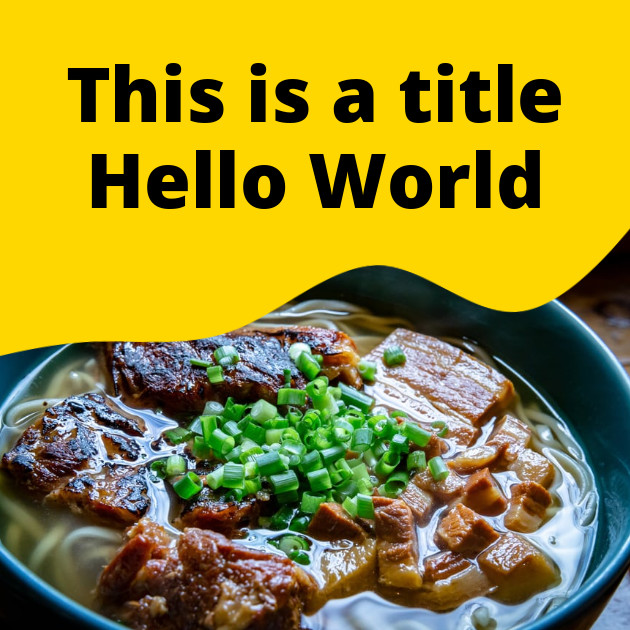
Create an image with some text and an image from an external server.


Bannerbear is a service that auto generates images and videos.
See examples in Image Examples and Video Examples.
Bannerbear uses API keys to allow access to the API. You can get an API key by creating a project in Bannerbear.
Bannerbear expects the API key to be included in all API requests to the server in a header that looks like the following:
Authorization: Bearer API_KEY
All API requests on Bannerbear are scoped to a Project.
Project API Key
This key enables you to interact with a specific project via API.
You can find the Project API Key in your Project → Settings page.
Master API Key
You can optionally create a Master API Key which allows higher level access at the account level.
There are two types of Master API Key:
When using a Full Access Master API Key to interact with a Project using any of the standard endpoints below, you must add a project_id parameter to your payload.
| get | /v2/auth |
{
  "message": "Authorized",
  "project": "My Project Name"
}To check your account status at any time you can use this endpoint. It will respond with your quota levels and current usage levels. Usage resets at the start of every month.
| get | /v2/account |
{
  "created_at": "2019-10-22T09:49:45.265Z",
  "uid": "jJWBKNELpQPvbX5R93Gk",
  "paid_plan_name": "Bannerbear Automate",
  "api_usage": 391,
  "api_quota": 1000,
  "current_project": {
    "name": "My Project Name",
    "templates": 42,
  }
}The Bannerbear API uses the following status / error codes. The Bannerbear API rate limit is 30 requests per 10 seconds.
| 202 | Accepted -- Your request is has been accepted for processing |
| 200 | OK |
| 400 | Bad Request -- Your request is invalid. |
| 401 | Unauthorized -- Your API key is wrong. |
| 402 | Payment Required -- Your have run out of image and/or video quota. |
| 404 | Not Found -- The specified request could not be found. |
| 429 | Too Many Requests -- Slow down! |
| 500 | Internal Server Error -- We had a problem with our server. Try again later. |
| 503 | Service Unavailable -- We're temporarily offline for maintenance. Please try again later. |
You can turn on additional debugging in Project Settings > Advanced > Additional Debugging Info.
When enabled, this enhances webhook data with info on whether Bannerbear was able to successfully load external media.
| Attempt | The external media is queued for loading |
| Success | The external media loaded successfully |
| Slow Image | The external media is loading slowly and will be retried |
| Fail | The external media failed to load and will be retried |
| Could Not Load | The external media failed to load after multiple retries |
| Error | One or more external media failed to load after multiple retries, causing a timeout |
The Bannerbear API is primarily asynchronous. When generating a new image, collection etc you POST a request, the API responds immediately with 202 Accepted and you either receive the generated result via webhook or via polling.
This is the preferred pattern as it keeps the request / response cycle predictable.
However, there is a synchronous option if you would simply like to wait for the response in the initial request.
To make a synchronous request use the synchronous base URL. The API required attributes / parameters function the same as normal. Synchronous requests will wait until the media file has finished generating before responding.
There is a timeout of 10 seconds on synchronous requests. Timeouts respond with a 408 status code.
Another option for synchronous image generation is using the signed URLs feature.
https://sync.api.bannerbear.com| POST | /v2/images |
| POST | /v2/collections |
| POST | /v2/screenshots |
Images are the main resource on Bannerbear.
You generate images by sending a POST request with a template uid and a list of template modifications you want to apply. These modifications can be things like: changing the text, changing the images or changing the colors.
Bannerbear will respond with JPG and PNG (and PDF, if requested) formats of the new Image you have requested.
| post | /v2/images |
| get | /v2/images/:uid |
| get | /v2/images |
These attributes are populated by Bannerbear. All other attributes of the object are set by the user at the time of creation.
{
  "created_at": "2020-02-20T07:59:23.077Z",
  "status": "pending",
  "self": "https://api.bannerbear.com/v2/images/kG39R5XbvPQpLENKBWJj",
  "uid": "kG39R5XbvPQpLENKBWJj",
  "image_url": null,
  "template": "6A37YJe5qNDmpvWKP0",
  "modifications": [
    {
      "name": "title",
      "text": "Lorem ipsum dolor sit amed",
      "color": null,
      "background": null
    },
    {
      "name": "avatar",
      "image_url": "https://www.bannerbear.com/assets/sample_avatar.jpg"
    }
  ],
  "webhook_url": null,
  "webhook_response_code": null,
  "transparent": false,
  "metadata": null,
  "render_pdf": false,
  "pdf_url": null,
  "width": 1000,
  "height": 1000
}Creating an image on Bannerbear is achieved via this endpoint.
This endpoint responds with 202 Accepted after which your image will be queued to generate. Images are usually rendered within a few seconds. When completed, the status changes to completed.
You can poll the GET endpoint for status updates or use a webhook to get the final image posted to you.
This endpoint supports synchronous generation.
| post | /v2/images |
var data = {
  "template" : "jJWBKNELpQPvbX5R93Gk",
  "modifications" : [
    {
      "name" : "layer1",
      "text" : "This is my text"
    },
    {
      "name" : "photo",
      "image_url" : "https://www.pathtomyphoto.com/1.jpg"
    }
  ]
}
fetch('https://api.bannerbear.com/v2/images', {
  method: 'POST',
  body: JSON.stringify(data),
  headers: {
    'Content-Type' : 'application/json',
    'Authorization' : `Bearer ${API_KEY}`
  }
})Retrieves a single Image object referenced by its unique ID.
| get | /v2/images/:uid |
fetch(`https://api.bannerbear.com/v2/images/${UID}`, {
  method: 'GET',
  headers: {
    'Authorization' : `Bearer ${API_KEY}`
  }
})Lists images inside a project.
| get | /v2/images |
fetch('https://api.bannerbear.com/v2/images', {
  method: 'GET',
  headers: {
    'Authorization' : `Bearer ${API_KEY}`
  }
})Create an image with some text and an image from an external server.
var data = {
  "template" : YOUR_TEMPLATE_ID,
  "modifications" : [
    {
      "name": "background",
      "image_url": "https://www.bannerbear.com/images/tools/photos/photo-1568096889942-6eedde686635.jpeg"
    },
    {
      "name": "title",
      "text": "This is a title Hello World"
    }
  ]
}
fetch('https://api.bannerbear.com/images', {
  method: 'POST',
  body: JSON.stringify(data),
  headers: {
    'Content-Type' : 'application/json',
    'Authorization' : `Bearer ${API_KEY}`
  }
})
Create an image with some text and an image from an external server. Change the font and apply an effect to the background image.
var data = {
  "template" : YOUR_TEMPLATE_ID,
  "modifications" : [
    {
      "name": "background",
      "image_url": "https://www.bannerbear.com/images/tools/photos/photo-1517446915321-65e972f1b494.jpeg",
      "effect": "Gaussian Blur"
    },
    {
      "name": "title",
      "text": "This is a title Hello World"
      "font_family": "Montserrat"
    }
  ]
}
fetch('https://api.bannerbear.com/images', {
  method: 'POST',
  body: JSON.stringify(data),
  headers: {
    'Content-Type' : 'application/json',
    'Authorization' : `Bearer ${API_KEY}`
  }
})
Create an image with some text and an image from an external server. Activate the secondary font styles set in the template.
var data = {
  "template" : YOUR_TEMPLATE_ID,
  "modifications" : [
    {
      "name": "background",
      "image_url": "https://images.unsplash.com/photo-1599974579688-8dbdd335c77f?ixid=MnwxMjA3fDB8MHxwaG90by1wYWdlfHx8fGVufDB8fHx8&ixlib=rb-1.2.1&auto=format&fit=crop&w=1671&q=80"
    },
    {
      "name": "title",
      "text": "Like tacos? *We love tacos*"
    }
  ]
}
fetch('https://api.bannerbear.com/images', {
  method: 'POST',
  body: JSON.stringify(data),
  headers: {
    'Content-Type' : 'application/json',
    'Authorization' : `Bearer ${API_KEY}`
  }
})
Create a PDF.
var data = {
  "template" : YOUR_TEMPLATE_ID,
  "render_pdf" : true,
  "modifications" : [
    {
      "name": "background",
      "image_url": "https://www.bannerbear.com/images/tools/photos/photo-1568096889942-6eedde686635.jpeg"
    },
    {
      "name": "title",
      "text": "This is a title *Hello World*"
    }
  ]
}
fetch('https://api.bannerbear.com/images', {
  method: 'POST',
  body: JSON.stringify(data),
  headers: {
    'Content-Type' : 'application/json',
    'Authorization' : `Bearer ${API_KEY}`
  }
})
Videos are generated from a Video Template.
Bannerbear can generate 3 types of video:
These are set at the Video Template level.
You generate videos by sending a POST request with a video template uid, a list of template modifications you want to apply, and a media file.
Bannerbear will respond with an MP4 format of the new Video you have requested.
| post | /v2/videos |
| get | /v2/videos/:uid |
| patch | /v2/videos |
| get | /v2/videos |
These attributes are populated by Bannerbear. All other attributes of the object are set by the user at the time of creation.
{
  "input_media_url": "https://www.bannerbear.com/audio/test.m4a",
  "created_at": "2020-09-16T05:30:19.568Z",
  "length_in_seconds": 0,
  "approval_required": true,
  "approved": false,
  "status": "pending",
  "self": "https://api.bannerbear.com/v2/videos/kG39R5XbvPQpLENKBWJj",
  "uid": "kG39R5XbvPQpLENKBWJj",
  "render_type": "overlay",
  "percent_rendered": 0,
  "video_url": null,
  "modifications": [
    {
      "name": "avatar",
      "image_url": "https://cdn.bannerbear.com/sample_images/welcome_bear_photo.jpg"
    }
  ],
  "frames": null,
  "frame_durations": null,
  "webhook_url": null,
  "webhook_response_code": null,
  "metadata": null,
  "transcription": null,
  "width": 1000,
  "height": 1000,
  "create_gif_preview": false,
  "gif_preview_url": null
}Creating a video on Bannerbear is achieved via this endpoint.
This endpoint responds with 202 Accepted after which your video will be queued to generate. Video rendering time depends on length / complexity of the video. It can vary from a few seconds to a few minutes. When completed, the status changes to completed.
You can poll the GET endpoint for status updates or use a webhook to get the final video posted to you.
| post | /v2/videos |
//add a simple text overlay to a video
var data = {
  "video_template" : "9JWBASDKLpQPvbX5R93Gk",
  "input_media_url": "https://www.bannerbear.com/my/video.mp4",
  "modifications" : [
    {
      "name" : "layer1",
      "text" : "This is my text"
    }
  ]
}
fetch('https://api.bannerbear.com/v2/videos', {
  method: 'POST',
  body: JSON.stringify(data),
  headers: {
    'Content-Type' : 'application/json',
    'Authorization' : `Bearer ${API_KEY}`
  }
})| get | /v2/videos/:uid |
fetch(`https://api.bannerbear.com/v2/videos/${UID}`, {
  method: 'GET',
  headers: {
    'Authorization' : `Bearer ${API_KEY}`
  }
})| patch | /v2/videos |
//update a transcription and begin rendering
var data = {
  "uid": "ASDKLpQPvbX",
  "transcription" : [
    "This is a replacement for line 1",
    "and this is a replacement for line 2"
  ],
  "approved" : true
}
fetch(`https://api.bannerbear.com/v2/videos`, {
  method: 'PATCH',
  body: JSON.stringify(data),
  headers: {
    'Content-Type' : 'application/json',
    'Authorization' : `Bearer ${API_KEY}`
  }
})| get | /v2/videos |
fetch('https://api.bannerbear.com/v2/videos', {
  method: 'GET',
  headers: {
    'Authorization' : `Bearer ${API_KEY}`
  }
})
Click to Play
Create a video using the Overlay build pack with some text, image and background video from an external server.
var data = {
  "video_template" : YOUR_TEMPLATE_ID,
  "input_media_url": "https://www.bannerbear.com/video/landscape_short.mp4",
  "modifications" : [
    {
      "name": "subtitle",
      "text": "Lorem ipsum"
    },
    {
      "name": "avatar",
      "image_url": "https://www.bannerbear.com/images/tools/people/51.jpg"
    }
  ]
}
fetch('https://api.bannerbear.com/videos', {
  method: 'POST',
  body: JSON.stringify(data),
  headers: {
    'Content-Type' : 'application/json',
    'Authorization' : `Bearer ${API_KEY}`
  }
})
Click to Play
Create a video using the Transcribe build pack with an image and background video from an external server. The audio is transcribed automatically by Bannerbear.
var data = {
  "video_template" : YOUR_TEMPLATE_ID,
  "input_media_url": "https://www.bannerbear.com/video/landscape_short.mp4",
  "modifications" : [
    {
      "name": "avatar",
      "image_url": "https://www.bannerbear.com/images/tools/people/82.jpg"
    }
  ]
}
fetch('https://api.bannerbear.com/videos', {
  method: 'POST',
  body: JSON.stringify(data),
  headers: {
    'Content-Type' : 'application/json',
    'Authorization' : `Bearer ${API_KEY}`
  }
})
Click to Play
Create a video using the Multi Overlay build pack with some text, image and background video from an external server.
var data = {
  "video_template" : YOUR_TEMPLATE_ID,
  "input_media_url": "https://www.bannerbear.com/video/landscape_short.mp4",
  "frames": [
    [
      {
        "name": "subtitle",
        "text": "This is frame one..."
      },
      {
        "name": "avatar",
        "image_url": "https://www.bannerbear.com/images/tools/people/51.jpg"
      }
    ],
    [
      {
        "name": "subtitle",
        "text": "This is frame two!"
      },
      {
        "name": "avatar",
        "image_url": "https://www.bannerbear.com/images/tools/people/82.jpg"
      }
    ]
  ]
}
fetch('https://api.bannerbear.com/videos', {
  method: 'POST',
  body: JSON.stringify(data),
  headers: {
    'Content-Type' : 'application/json',
    'Authorization' : `Bearer ${API_KEY}`
  }
})
Click to Play
Create a video using the Multi Overlay build pack with some text and images, with no background video. This is essentially a video slideshow.
var data = {
  "video_template" : YOUR_TEMPLATE_ID,
  "frames": [
    [
      {
        "name": "subtitle",
        "text": "This is the 1st frame"
      },
      {
        "name": "avatar",
        "image_url": "https://www.bannerbear.com/images/tools/people/82.jpg"
      }
    ],
    [
      {
        "name": "subtitle",
        "text": "This is the 2nd frame, how's it going?"
      },
      {
        "name": "avatar",
        "image_url": "https://www.bannerbear.com/images/tools/people/82.jpg"
      }
    ],
    [
      {
        "name": "subtitle",
        "text": "This is the last frame, goodbye! 🐻"
      },
      {
        "name": "avatar",
        "image_url": "https://www.bannerbear.com/images/tools/people/82.jpg"
      }
    ]
  ]
}
fetch('https://api.bannerbear.com/videos', {
  method: 'POST',
  body: JSON.stringify(data),
  headers: {
    'Content-Type' : 'application/json',
    'Authorization' : `Bearer ${API_KEY}`
  }
})Sometimes you want to use the same data payload but push to multiple templates at once.
In Bannerbear, you can do this by grouping templates together in a Template Set. Pushing data to a Template Set results in a response that includes multiple images (depending on how many templates were in your set).
This multi-image object is known as a Collection.
These attributes are populated by Bannerbear. All other attributes of the object are set by the user at the time of creation.
{
  "created_at": "2020-07-31 04:28:32 UTC",
  "uid": "rZdpMYmAnDB1zb3kXL",
  "self": "https://api.bannerbear.com/v2/collections/rZdpMYmAnDB1zb3kXL",
  "template_set": "Dbl5xYVgKRzLwaNdqo",
  "status": "completed",
  "modifications": [
    {
      "name": "text_container",
      "text": "Hello World"
    }
  ],
  "webhook_url": null,
  "webhook_response_code": null,
  "transparent": false,
  "metadata": null,
  "image_urls": {
    "template_EagXkA3DwM1ZW2VBYw_image_url": "https://cdn.bannerbear.com/...",
    "template_197xPQmDnLqZG3E82Y_image_url": "https://cdn.bannerbear.com/..."
  },
  "images": [
    //array of Image objects
  ]
}Creating a collection on Bannerbear is achieved via this endpoint and behaves the same as creating a single Image except with a different response.
This endpoint responds with 202 Accepted after which your collection will be queued to generate. Collections are usually rendered within a few seconds. When completed, the status changes to completed.
You can poll the GET endpoint for status updates or use a webhook to get the final video posted to you.
This endpoint supports synchronous generation.
| post | /v2/collections |
var data = {
  "template_set" : "LXk3bz1BDnAmYMpdZr",
  "modifications" : [
    {
      "name" : "layer1",
      "text" : "This is my text"
    },
    {
      "name" : "photo",
      "image_url" : "https://www.pathtomyphoto.com/1.jpg"
    }
  ]
}
fetch('https://api.bannerbear.com/v2/collections', {
  method: 'POST',
  body: JSON.stringify(data),
  headers: {
    'Content-Type' : 'application/json',
    'Authorization' : `Bearer ${API_KEY}`
  }
})| get | /v2/collections/:uid |
fetch(`https://api.bannerbear.com/v2/collections/${UID}`, {
  method: 'GET',
  headers: {
    'Authorization' : `Bearer ${API_KEY}`
  }
})| get | /v2/collections |
fetch('https://api.bannerbear.com/v2/collections', {
  method: 'GET',
  headers: {
    'Authorization' : `Bearer ${API_KEY}`
  }
})
Animated Gifs on Bannerbear take the form of simple slideshows. You can add multiple frames, control the duration of individual frames, control the number of loops and more.
These attributes are populated by Bannerbear. All other attributes of the object are set by the user at the time of creation.
{
  "created_at": "2020-12-02T05:35:57.364Z",
  "uid": "a46YPx8Z65pwmKrdGE",
  "self": "https://api.bannerbear.com/v2/animated_gifs/a46YPx8Z65pwmKrdGE",
  "template": "1eGqK9b33PxbnaYpP8",
  "status": "pending",
  "input_media_url": null,
  "frames": [
    [], //list of modifications
    [], //list of modifications
    []  //list of modifications
  ],
  "fps": 1,
  "frame_durations": null,
  "loop": true,
  "image_url": null,
  "webhook_url": null,
  "webhook_response_code": null,
  "metadata": null
}This endpoint responds with 202 Accepted after which your animated gif will be queued to generate. Animated gifs are usually rendered within a few seconds. When completed, the status changes to completed.
You can poll the GET endpoint for status updates or use a webhook to get the final animated gif posted to you.
| post | /v2/animated_gifs |
var data = {
  "template" : "1eGqK9b33PxbnaYpP8",
  "frames" : [
    [ //frame 1 starts here
      {
        "name" : "layer1",
        "text" : "This is my text"
      },
      {
        "name" : "photo",
        "image_url" : "https://www.pathtomyphoto.com/1.jpg"
      }
    ],
    [ //frame 2 starts here
      {
        "name" : "layer1",
        "text" : "This is my follow up text"
      },
      {
        "name" : "photo",
        "image_url" : "https://www.pathtomyphoto.com/2.jpg"
      }
    ]
  ]
}
fetch('https://api.bannerbear.com/v2/animated_gifs', {
  method: 'POST',
  body: JSON.stringify(data),
  headers: {
    'Content-Type' : 'application/json',
    'Authorization' : `Bearer ${API_KEY}`
  }
})| get | /v2/animated_gifs/:uid |
fetch(`https://api.bannerbear.com/v2/animated_gifs/${UID}`, {
  method: 'GET',
  headers: {
    'Authorization' : `Bearer ${API_KEY}`
  }
})| get | /v2/animated_gifs |
fetch('https://api.bannerbear.com/v2/animated_gifs', {
  method: 'GET',
  headers: {
    'Authorization' : `Bearer ${API_KEY}`
  }
})The Bannerbear API includes a screenshot tool if you need to capture screenshots of public webpages.
This endpoint supports synchronous generation.
These attributes are populated by Bannerbear. All other attributes of the object are set by the user at the time of creation.
{
  "url": "https://www.apple.com",
  "width": 1200,
  "height": 3000,
  "created_at": "2021-01-05T06:54:52.912Z",
  "mobile": false,
  "self": "https://api.bannerbear.com/v2/screenshots/xwbeAQqO70Y3oyd2WY",
  "uid": "xwbeAQqO70Y3oyd2WY",
  "screenshot_image_url": null,
  "webhook_url": null,
  "webhook_response_code": null,
  "status": "pending"
}This endpoint responds with 202 Accepted after which your screenshot will be queued to generate. Screenshots are usually rendered within a few seconds. When completed, the status changes to completed.
You can poll the GET endpoint for status updates or use a webhook to get the final screenshot posted to you.
| post | /v2/screenshots |
var data = {
  "url" : "https://www.apple.com"
}
fetch('https://api.bannerbear.com/v2/screenshots', {
  method: 'POST',
  body: JSON.stringify(data),
  headers: {
    'Content-Type' : 'application/json',
    'Authorization' : `Bearer ${API_KEY}`
  }
})| get | /v2/screenshots/:uid |
fetch(`https://api.bannerbear.com/v2/screenshots/${UID}`, {
  method: 'GET',
  headers: {
    'Authorization' : `Bearer ${API_KEY}`
  }
})| get | /v2/screenshots |
fetch('https://api.bannerbear.com/v2/screenshots', {
  method: 'GET',
  headers: {
    'Authorization' : `Bearer ${API_KEY}`
  }
})
Templates are the reusable designs that you create in the Bannerbear editor. You can list a project's templates via the API.
You can design a template using the Bannerbear template editor, or you can add one from the template library (and modify it as needed).
Every template has a list of modifications available, for example text boxes that you can populate with different text, or image placeholders that you can replace with different images.
{
  "created_at": "2020-03-17T01:58:07.358Z",
  "name": "Twitter Demo",
  "self": "https://api.bannerbear.com/v2/templates/04PK8K2bctXHjqB97O",
  "uid": "04PK8K2bctXHjqB97O",
  "preview_url": null,
  "width": 1000,
  "height": 1000,
  "available_modifications": [
    {
      "name": "avatar",
      "image_url": null
    },
    {
      "name": "name",
      "text": null
    },
    {
      "name": "handle",
      "text": null
    },
    {
      "name": "body",
      "text": null
    }
  ],
  "tags": [
    "shoes",
    "instagram"
  ]
}This endpoint allows you create blank templates, which you can then use with the Sessions API to provide your users a blank canvas plus editor environment to design their own templates from scratch.
| post | /v2/templates |
var data = {
  "name" : "My Template",
  "width": 1000,
  "height": 900
}
fetch('https://api.bannerbear.com/v2/templates', {
  method: 'POST',
  body: JSON.stringify(data),
  headers: {
    'Content-Type' : 'application/json',
    'Authorization' : `Bearer ${API_KEY}`
  }
})You can duplicate templates with this endpoint, which is useful if you are using the Sessions API. Let your users select templates from your custom library, then duplicate the template and create a Session so that they can customize it.
| post | /v2/templates?source=:uid |
fetch(`https://api.bannerbear.com/v2/templates?source=${UID}`, {
  method: 'POST',
  headers: {
    'Authorization' : `Bearer ${API_KEY}`
  }
})| get | /v2/templates/:uid |
fetch(`https://api.bannerbear.com/v2/templates/${UID}`, {
  method: 'GET',
  headers: {
    'Authorization' : `Bearer ${API_KEY}`
  }
})You can edit some basic attributes of a Template via the API.
| patch | /v2/templates/:uid |
var data = {
  "tags" : [
    "Tag1",
    "Tag2"
  ],
  "name" : "My template"
}
fetch(`https://api.bannerbear.com/v2/templates/${UID}`, {
  method: 'PATCH',
  body: JSON.stringify(data),
  headers: {
    'Content-Type' : 'application/json',
    'Authorization' : `Bearer ${API_KEY}`
  }
})| get | /v2/templates |
fetch('https://api.bannerbear.com/v2/templates', {
  method: 'GET',
  headers: {
    'Authorization' : `Bearer ${API_KEY}`
  }
})You can import templates to a project from the public library, or any templates that have been shared publicly in your account or other accounts.
The parameters in this request should be Publication IDs. These are the IDs of publicly-available templates either from the library or shared by other users. This request will not work with private template IDs.
This endpoint does not attempt to de-dupe, if you call it twice with the same payload, templates will be imported twice.
If you are looking for a JSON feed of all templates (publications) in the Bannerbear template library, you can find that here.
| post | /v2/templates/import |
var data = {
  "publications" : [
    "ao9gyzedjlb3bw0j7m",
    "ewmqrbyd5vqoj9xz7z"
  ]
}
fetch(`https://api.bannerbear.com/v2/templates/import`, {
  method: 'POST',
  body: JSON.stringify(data),
  headers: {
    'Content-Type' : 'application/json',
    'Authorization' : `Bearer ${API_KEY}`
  }
})Permanently delete a template from your project. This action cannot be undone.
| delete | /v2/templates/:uid |
fetch(`https://api.bannerbear.com/v2/templates/${UID}`, {
  method: 'DELETE',
  headers: {
    'Authorization' : `Bearer ${API_KEY}`
  }
})Templates Sets are sets of Templates that you group together in the Bannerbear dashboard. You can create, modify and list a project's template sets via the API.
{
  "name": "My Template Set",
  "created_at": "2020-11-11T02:48:54.472Z",
  "self": "http://api.bannerbear.com/v2/template_sets/VymBYa7gMjW6JQ2njM",
  "uid": "VymBYa7gMjW6JQ2njM",
  "available_modifications": [
    {
      "name": "tweet",
      "text": null,
      "color": null,
      "background": null
    },
    {
      "name": "avatar",
      "image_url": null
    },
    {
      "name": "name",
      "text": null,
      "color": null,
      "background": null
    }
  ],
  "templates": [
    //array of Template objects
  ]
}| post | /v2/template_sets |
var data = {
  "name": "My Template Set",
  "templates": [
    "p4KnlWBbK1V5OQGgm1",
    "r6anBGWDA1EDO38124",
    "RPowdyxbdM8ZlYBAgQ",
  ],
}
fetch('https://api.bannerbear.com/v2/template_sets', {
  method: 'POST',
  body: JSON.stringify(data),
  headers: {
    'Content-Type' : 'application/json',
    'Authorization' : `Bearer ${API_KEY}`
  }
})| patch | /v2/template_sets/:uid |
var data = {
  "templates": [
    "p4KnlWBbK1V5OQGgm1",
    "r6anBGWDA1EDO38124"
  ],
}
fetch(`https://api.bannerbear.com/v2/template_sets/${UID}`, {
  method: 'PATCH',
  body: JSON.stringify(data),
  headers: {
    'Content-Type' : 'application/json',
    'Authorization' : `Bearer ${API_KEY}`
  }
})| get | /v2/template_sets/:uid |
fetch(`https://api.bannerbear.com/v2/template_sets/${UID}`, {
  method: 'GET',
  headers: {
    'Authorization' : `Bearer ${API_KEY}`
  }
})| get | /v2/template_sets |
fetch('https://api.bannerbear.com/v2/template_sets', {
  method: 'GET',
  headers: {
    'Authorization' : `Bearer ${API_KEY}`
  }
})
Video Templates are a subset of Templates.
Templates for Images hold design / layout information - as would be required to render Images.
Video Templates simply hold some extra instructions, telling Bannerbear what kind of video to render.
These are called Build Packs and there are 3 types:
{
  "created_at": "2020-09-15T05:21:22.066Z",
  "self": "http://api.bannerbear.com/v2/video_templates/GL4kqNvzJ09lYxgVdO",
  "uid": "GL4kqNvzJ09lYxgVdO",
  "parent_template_uid": "VymBYa7gMjW6JQ2njM",
  "name": "Quote Example",
  "width": 1000,
  "height": 1000,
  "approval_required": true,
  "preview_url": null,
  "render_type": "transcribe",
  "available_modifications": [
    {
      "name": "avatar",
      "image_url": null
    },
    {
      "name": "name",
      "text": null,
      "color": null,
      "background": null
    },
    {
      "name": "subtitle",
      "text": null,
      "color": null,
      "background": null
    }
  ]
}| post | /v2/video_templates |
var data = {
  "template": "p4KnlWBbK1V5OQGgm1",
  "render_type": "overlay"
}
fetch('https://api.bannerbear.com/v2/video_templates', {
  method: 'POST',
  body: JSON.stringify(data),
  headers: {
    'Content-Type' : 'application/json',
    'Authorization' : `Bearer ${API_KEY}`
  }
})| get | /v2/video_templates/:uid |
fetch(`https://api.bannerbear.com/v2/video_templates/${UID}`, {
  method: 'GET',
  headers: {
    'Authorization' : `Bearer ${API_KEY}`
  }
})| get | /v2/video_templates |
fetch('https://api.bannerbear.com/v2/video_templates', {
  method: 'GET',
  headers: {
    'Authorization' : `Bearer ${API_KEY}`
  }
})
Sessions provide your users with access to the Bannerbear template editor. When you create a Session you will receive a session_editor_url which provides secure, expiring access to the Bannerbear template editor for a specific template. This link can be used by your user, even if they are not a Bannerbear member.
Preview Mode
You can create a read-only preview mode with no editor tools using the parameter {preview_mode: true}.
By appending a base64-encoded query string of modifications to the session_editor_url in Preview Mode you can preview template modifications to your users. See embedding the template editor on the knowledge base.
{
  "session_started_at": null,
  "created_at": "2022-10-27T07:27:41.092Z",
  "self": "https://api.bannerbear.com/v2/sessions/rpdmzYDgW0o9GEwJA5",
  "uid": "rpdmzYDgW0o9GEwJA5",
  "session_editor_url": "https://app.bannerbear.com/session/zda8di132nxbOTL09qjH13vBwwtt",
  "metadata": null,
  "expired": false,
  "preview_mode": null,
  "template": "j14WwV5VQ0jvZa7XrB",
  "width": 1200,
  "height": 630
}| post | /v2/sessions |
var data = {
  "template" : "j14WwV5VQ0jvZa7XrB"
}
fetch('https://api.bannerbear.com/v2/sessions', {
  method: 'POST',
  body: JSON.stringify(data),
  headers: {
    'Content-Type' : 'application/json',
    'Authorization' : `Bearer ${API_KEY}`
  }
})| get | /v2/sessions/:uid |
fetch(`https://api.bannerbear.com/v2/sessions/${UID}`, {
  method: 'GET',
  headers: {
    'Authorization' : `Bearer ${API_KEY}`
  }
})| get | /v2/sessions |
fetch('https://api.bannerbear.com/v2/sessions', {
  method: 'GET',
  headers: {
    'Authorization' : `Bearer ${API_KEY}`
  }
})
Webhooks are used in Bannerbear to notify your system of when assets are generated.
Bannerbear features two methods to set webhooks. The first method is to pass a webhook_url parameter when generating an Image, Collection, Video etc.
The second method is to set Project-level webhooks that will fire for all events of a specific type within your project. You can register these Project-level webhooks via the Project > Advanced Settings page, or via this API endpoint.
| post | /v2/webhooks |
| get | /v2/webhooks/:uid |
| delete | /v2/webhooks/:uid |
{
  "url": "https://webhook.site/76d4c2ce-5cbf-4f75-a32f-c8e2182ff0bb",
  "event": "image_created",
  "created_at": "2022-03-21T03:51:06.469Z",
  "uid": "QXYlGg4rbAJE5ZoDkm",
  "self": "https://api.bannerbear.com/v2/webhooks/QXYlGg4rbAJE5ZoDkm"
}| post | /v2/webhooks |
var data = {
  "url" : "https://webhook.site/76d4c2ce-5cbf-4f75-a32f-c8e2182ff0bb",
  "event": "image_created"
}
fetch('https://api.bannerbear.com/v2/webhooks', {
  method: 'POST',
  body: JSON.stringify(data),
  headers: {
    'Content-Type' : 'application/json',
    'Authorization' : `Bearer ${API_KEY}`
  }
})| get | /v2/webhooks/:uid |
fetch(`https://api.bannerbear.com/v2/webhooks/${UID}`, {
  method: 'GET',
  headers: {
    'Authorization' : `Bearer ${API_KEY}`
  }
})| delete | /v2/webhooks/:uid |
fetch(`https://api.bannerbear.com/v2/webhooks/${UID}`, {
  method: 'DELETE',
  headers: {
    'Authorization' : `Bearer ${API_KEY}`
  }
})A Movie is a series of Video clips joined together in sequence, using optional transitions, into a single MP4 file. Bannerbear handles the cropping and encoding of files automatically.
An example use case for a Movie is when your business has videos with a consistent intro and outro, and you want to place dynamically-generated Video content from the Bannerbear /videos endpoint between them.
Another use case for a Movie is when you want to join static images together in an MP4 slideshow with transitions.
| post | /v2/movies |
| get | /v2/movies/:uid |
| get | /v2/movies |
These attributes are populated by Bannerbear. All other attributes of the object are set by the user at the time of creation.
{
  "created_at": "2020-02-20T07:59:23.077Z",
  "status": "pending",
  "self": "https://api.bannerbear.com/v2/images/9R5XbvPQkG3pLENKBWJj",
  "uid": "9R5XbvPQkG3pLENKBWJj",
  "width": 800,
  "height": 500,
  "percent_rendered": 0,
  "total_length_in_seconds": null,
  "transition": "fade",
  "soundtrack_url": null,
  "inputs": [
    {
      "asset_url": "https://externalhost.com/assets/intro.mp4"
    },
    {
      "asset_url": "https://cdn.bannerbear.com/videos/123kjh918u2313.mp4",
      "trim_to_length_in_seconds": 10,
      "mute": true
    },
    {
      "asset_url": "https://externalhost.com/assets/outro.mp4"
    }
  ],
  "movie_url": null,
  "webhook_url": null,
  "webhook_response_code": null,
  "metadata": null
}You can combine up to 10 video clips into a movie. Video clips should be listed chronologically in the inputs parameter.
Instead of a video clip you can also use a static image url in the asset_url parameter. When using a static image, it will be shown for 5 seconds by default in the final movie. You can change this using the trim_to_length_in_seconds parameter.
| post | /v2/movies |
var data = {
  "width" : 800,
  "height" : 500,
  "transition" : "fade",
  "soundtrack_url" : "https://externalhost.com/assets/music.mp3",
  "inputs" : [
    {
      "asset_url": "https://externalhost.com/assets/intro.mp4"
    },
    {
      "asset_url": "https://cdn.bannerbear.com/videos/123kjh918u2313.mp4",
      "trim_to_length_in_seconds": 10,
      "mute": true
    },
    {
      "asset_url": "https://externalhost.com/assets/outro.mp4"
    }
  ]
}
fetch('https://api.bannerbear.com/v2/movies', {
  method: 'POST',
  body: JSON.stringify(data),
  headers: {
    'Content-Type' : 'application/json',
    'Authorization' : `Bearer ${API_KEY}`
  }
})| get | /v2/movies/:uid |
fetch(`https://api.bannerbear.com/v2/movies/${UID}`, {
  method: 'GET',
  headers: {
    'Authorization' : `Bearer ${API_KEY}`
  }
})| get | /v2/movies |
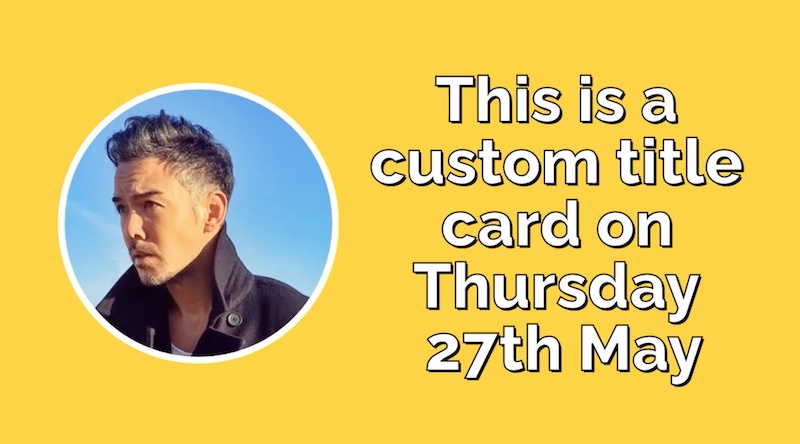
Click to Play
Create a movie by combining still images and video with a transition
var data = {
  "width": 1200,
  "height": 670,
  "transition": "fade",
  "inputs": [
    {
      "asset_url": "https://images.bannerbear.com/requests/images/004/702/393/original/55480c60b5ac6d977fdf5076bd29136908f52505.png",
      "trim_to_length_in_seconds": 3
    },
    {
      "asset_url": "https://videos.bannerbear.com/completed/movie-x62aV0wjW0LKOYkm1X.mp4"
    },
    {
      "asset_url": "https://images.bannerbear.com/requests/images/004/702/433/original/a6f4d342cb4241350527ca6ab2e7a21226c288d6.png",
      "trim_to_length_in_seconds": 3
    }
  ]
}
fetch('https://api.bannerbear.com/movies', {
  method: 'POST',
  body: JSON.stringify(data),
  headers: {
    'Content-Type' : 'application/json',
    'Authorization' : `Bearer ${API_KEY}`
  }
})
Fonts are set at the template level in Bannerbear. When you design a template and create a text box, you choose a font for that text box. So it is not necessary to set fonts when creating images via the API, as the defaults will be used.
However, if you wish you can change fonts in your images on-the-fly when creating an image by adding a font_family parameter and the name of a valid font.
If you use an invalid font name when creating an image, the template default font will be used.
This endpoint simply returns a list of valid fonts.
| get | /v2/fonts |
{
  "Serif": [
    "Abril Fatface",
    "Alegreya",
    "Arvo",
    "BioRhyme",
    "Corben",
    "Cormorant",
    "Courier Prime",
    "Coustard",
    "DM Serif Display",
    "Eczar",
    "Frank Ruhl Libre",
    "Gravitas One",
    "IBM Plex Serif",
    "Jomolhari",
    "Libre Baskerville",
    "Lora",
    "Merriweather",
    "Neuton",
    "Noto Serif",
    "Old Standard TT",
    "PT Serif",
    "Playfair Display",
    "Prata",
    "Source Serif Pro",
    "Spectral",
    "Vollkorn"
  ],
  "Sans Serif": [
    "Alegreya Sans",
    "Anton",
    "Archivo",
    "Archivo Narrow",
    "Cabin",
    "Catamaran",
    "Chivo",
    "Fira Sans",
    "IBM Plex Sans",
    "Karla",
    "Lato",
    "Libre Franklin",
    "Montserrat",
    "Muli",
    "Noto Sans",
    "Nunito",
    "Open Sans",
    "Oswald",
    "Oxygen",
    "PT Sans",
    "Pontano Sans",
    "Poppins",
    "Puritan",
    "Raleway",
    "Roboto",
    "Source Sans Pro",
    "Space Mono",
    "Titillium Web",
    "Ubuntu",
    "Varela",
    "Work Sans"
  ],
  "Novelty": [
    "Caveat",
    "Courgette",
    "Delius",
    "Kalam",
    "Merienda",
    "Patrick Hand",
    "Permanent Marker",
    "Press Start 2P",
    "Satisfy",
    "VT323"
  ],
  "International": [
    "Noto Sans SC",
    "Noto Sans TC",
    "Noto Sans JP",
    "Noto Sans KR"
  ],
  "Custom": [
    "bb_custom_font_2cd55546-ec00-4af9-aeca-4a3cd186da53_otf"
  ]
}Bannerbear has a number of built-in effects that you can apply to image containers at the template level.
However, you can also set these on-the-fly when you make Image API requests using the effect property.
This is useful if you need to make multiple variations from a template, but use different effects in each one.
This endpoint simply returns a list of valid effects.
| get | /v2/effects |
[
  "Smart Crop",
  "Grayscale",
  "Sepia",
  "Gaussian Blur",
  "Grayscale + Gaussian Blur",
  "Flip Horizontal",
  "Flip Vertical",
  "Negate",
  "Gameboy",
  "16bit"
]Sometimes an image you generate on Bannerbear may not turn out as expected.
The most common problem is with imported images, which is the current focus for this diagnostic tool.
An imported image may be missing at the origin, or blocking Bannerbear access etc. This is usually due to permissions, file formats etc, but it can be tedious to track down the root cause.
This endpoint helps you isolate the problem, given an Image ID.
When you create a Diagnosis, Bannerbear will run through a series of checks on the data in the Image you have requested the diagnosis for. You will then receive a report with issues and suggested fixes.
The subtle difference between the singular Diagnosis and plural Diagnoses is easy to miss. Ensure you use the right spelling when using this endpoint.
These attributes are populated by Bannerbear. All other attributes of the object are set by the user at the time of creation.
{
  "uid": "KqePQDVvDXZwgNz2oJ",
  "type": "Image",
  "parent_uid": "kG39R5XbvPQpLENKBWJj",
  "self": "https://api.bannerbear.com/v2/diagnoses/KqePQDVvDXZwgNz2oJ",
  "status": "completed",
  "report": {
    "external_images": [
      {
        "image_url": "https://externalhost.com/assets/sample_avatar.jpg",
        "result": "success",
        "comment": null,
      },
      {
        "image_url": "https://externalhost.io/assets/ads123da.jpg",
        "result": "fail",
        "comment": "404 Not Found",
      }
    ]
  }
}This endpoint responds with 202 Accepted after which your report will be queued to generate.
When completed, the status changes to completed.
Use the GET endpoint to retrieve the final report.
| post | /v2/diagnoses |
//create a report for Image UID kG39R5XbvPQpLENKBWJj
var data = {
  "image_uid" : "kG39R5XbvPQpLENKBWJj"
}
fetch('https://api.bannerbear.com/v2/diagnoses', {
  method: 'POST',
  body: JSON.stringify(data),
  headers: {
    'Content-Type' : 'application/json',
    'Authorization' : `Bearer ${API_KEY}`
  }
})| get | /v2/diagnoses/:uid |
fetch(`https://api.bannerbear.com/v2/diagnoses/${UID}`, {
  method: 'GET',
  headers: {
    'Authorization' : `Bearer ${API_KEY}`
  }
})Bannerbear has a Signed URL feature which allows on-demand generation of images using encrypted URL parameters.
You can create the base URLs via API using this endpoint.
This endpoint only generates the Base URL, also known as a Signed Base. In order to generate images using the Base URL you will need to append encrypted URL parameters as described in the Signed URL documentation.
{
  "created_at": "2022-11-10T09:51:54.369Z",
  "uid": "KL754AzeNDqyJDXq2g",
  "base_url": "https://ondemand.bannerbear.com/signedurl/KL754AzeNDqyJDXq2g/image.jpg",
  "example_url": "https://ondemand.bannerbear.com/signedurl/KL754AzeNDqyJDXq2g/image.jpg?modifications=W3sibmFtZSI6ImltYWdlX2NvbnRhaW5lcl9yZWN0YW5nbGVfMiIsImltYWdlX3VybCI6Imh0dHBzOi8vY2RuLmJhbm5lcmJlYXIuY29tL3NhbXBsZV9pbWFnZXMvd2VsY29tZV9iZWFyX3Bob3RvLmpwZyJ9LHsibmFtZSI6InRleHRfY29udGFpbmVyXzMiLCJ0ZXh0IjoiR2VuZXJhdGVkIE9uIERlbWFuZCJ9XQ&s=57db158642394e5006ec561a7aab5110c4ec4b81fc1646dd94c502d9f88d3886"
}| post | /v2/templates/:uid/signed_bases |
fetch('https://api.bannerbear.com/v2/templates/:uid/signed_bases', {
  method: 'POST',
  headers: {
    'Content-Type' : 'application/json',
    'Authorization' : `Bearer ${API_KEY}`
  }
})| get | /v2/templates/:uid/signed_bases |
fetch(`https://api.bannerbear.com/v2/templates/${UID}/signed_bases`, {
  method: 'GET',
  headers: {
    'Authorization' : `Bearer ${API_KEY}`
  }
})You can create, retrieve and list projects via the API if you are using a Master API Key. These keys are created at the account level and are not associated with an individual project.
This is useful for building deeper implementations with Bannerbear where you need to create projects dynamically.
{
  "name": "My First Project",
  "created_at": "2023-04-17T05:31:47.953Z",
  "self": "https://api.bannerbear.com/v2/projects/vY7qXEd1ngzP8GAr3Q",
  "uid": "vY7qXEd1ngzP8GAr3Q",
  "templates": 3,
  "image_proxy" : false,
  "web_sessions" : false
}| post | /v2/projects |
var data = {
  "name" : "New Project",
  "image_proxy" : true,
  "web_sessions" : false
}
fetch('https://api.bannerbear.com/v2/projects', {
  method: 'POST',
  body: JSON.stringify(data),
  headers: {
    'Content-Type' : 'application/json',
    'Authorization' : `Bearer ${API_KEY}`
  }
})| get | /v2/projects/:uid |
fetch(`https://api.bannerbear.com/v2/projects/${UID}`, {
  method: 'GET',
  headers: {
    'Authorization' : `Bearer ${API_KEY}`
  }
})Hydrating a project will copy all templates from a source project into the project with the specified uid. Both projects must be under the same account.
Alternatively you can specify an array of template IDs if you want to import only specific templates into a project. Templates must all have the same parent account as the target project.
| post | /v2/projects/:uid/hydrate |
var data = {
  "source" : "vY7qXEd1ngzP8GAr3Q"
}
fetch('https://api.bannerbear.com/v2/projects/:uid/hydrate', {
  method: 'POST',
  body: JSON.stringify(data),
  headers: {
    'Content-Type' : 'application/json',
    'Authorization' : `Bearer ${API_KEY}`
  }
})| get | /v2/projects |
fetch('https://api.bannerbear.com/v2/projects', {
  method: 'GET',
  headers: {
    'Authorization' : `Bearer ${API_KEY}`
  }
})You can join multiple PDF files together into a single PDF using this endpoint.
These attributes are populated by Bannerbear. All other attributes of the object are set by the user at the time of creation.
{
  "status": "completed",
  "pdf_inputs": [
    "https://images.bannerbear.com/direct/wBpLjEMXNj6zNmPak0/requests/000/017/506/830/LWXrA1qRoQvVOvkvQypMJegBj/4e3b3e303f8ff9caae87ed68bed15c18df448ce1-compressed.pdf",
    "https://images.bannerbear.com/direct/wBpLjEMXNj6zNmPak0/requests/000/017/506/845/9e2VGL0qn6VPWoDXYEAv5mxr1/80360378d620b6fd490c9db0bb2720d4a84a61c8-compressed.pdf",
    "https://images.bannerbear.com/direct/wBpLjEMXNj6zNmPak0/requests/000/017/506/856/BjdZ0l7VAYA7N3P763Kn1DLqe/400b91737a51d520a5a237de2cc91f136413b6e6-compressed.pdf"
  ],
  "created_at": "2022-03-30T04:33:32.556Z",
  "webhook_url": null,
  "webhook_response_code": null,
  "uid": "4GKN5JERxblWjd3mAM",
  "self": "https://api.bannerbear.com/v2/utilities/pdf/join/4GKN5JERxblWjd3mAM",
  "joined_pdf_url": "https://images.bannerbear.com/join_pdfs/nPVv2dkMEL9Z3bp4Ay/4GKN5JERxblWjd3mAM/joined.pdf"
}| post | /v2/utilities/pdf/join |
var data = {
  "pdf_inputs": [
    "https://images.bannerbear.com/direct/wBpLjEMXNj6zNmPak0/requests/000/017/506/830/LWXrA1qRoQvVOvkvQypMJegBj/4e3b3e303f8ff9caae87ed68bed15c18df448ce1-compressed.pdf",
    "https://images.bannerbear.com/direct/wBpLjEMXNj6zNmPak0/requests/000/017/506/845/9e2VGL0qn6VPWoDXYEAv5mxr1/80360378d620b6fd490c9db0bb2720d4a84a61c8-compressed.pdf",
    "https://images.bannerbear.com/direct/wBpLjEMXNj6zNmPak0/requests/000/017/506/856/BjdZ0l7VAYA7N3P763Kn1DLqe/400b91737a51d520a5a237de2cc91f136413b6e6-compressed.pdf"
  ],
}
fetch('https://api.bannerbear.com/v2/utilities/pdf/join', {
  method: 'POST',
  body: JSON.stringify(data),
  headers: {
    'Content-Type' : 'application/json',
    'Authorization' : `Bearer ${API_KEY}`
  }
})| get | /v2/utilities/pdf/join/:uid |
fetch(`https://api.bannerbear.com/v2/utilities/pdf/join/${UID}`, {
  method: 'GET',
  headers: {
    'Authorization' : `Bearer ${API_KEY}`
  }
})You can rasterize a PDF file using this endpoint. It turns a PDF into a flat JPG and PNG, with configurable DPI. This is useful for generating large JPG / PNG files suitable for printing.
These attributes are populated by Bannerbear. All other attributes of the object are set by the user at the time of creation.
{
  "url": "https://images.bannerbear.com/direct/qm8Gx0MOW5EMBlae2v/requests/000/013/795/081/ZwVbKlDe9Y8N7LD068moa3jPM/0d40c07fe204b04edaaeb3ad36aeda919b251caa.pdf",
  "status": "completed",
  "dpi": 300,
  "created_at": "2022-01-21T06:04:06.637Z",
  "uid": "P8XANz2er9lky4WG65",
  "self": "https://api.bannerbear.com/v2/utilities/rasterizations/P8XANz2er9lky4WG65",
  "image_url_png": "https://images.bannerbear.com/rasterizations/nPVv2dkMEL9Z3bp4Ay/P8XANz2er9lky4WG65/image.png",
  "image_url_jpg": "https://images.bannerbear.com/rasterizations/nPVv2dkMEL9Z3bp4Ay/P8XANz2er9lky4WG65/image.jpg"
}| post | /v2/utilities/pdf/rasterize |
var data = {
  "url" : "https://www.myserver.com/sample.pdf"
}
fetch('https://api.bannerbear.com/v2/utilities/pdf/rasterize', {
  method: 'POST',
  body: JSON.stringify(data),
  headers: {
    'Content-Type' : 'application/json',
    'Authorization' : `Bearer ${API_KEY}`
  }
})| get | /v2/utilities/pdf/rasterize/:uid |
fetch(`https://api.bannerbear.com/v2/utilities/pdf/rasterize/${UID}`, {
  method: 'GET',
  headers: {
    'Authorization' : `Bearer ${API_KEY}`
  }
})